
GALE | School Based Telehealth
This page contains resources and frequently asked questions regarding School-Based Telehealth deployment
Frequently Asked Questions
School-Based Telehealth is one of our most important use cases. We also recognize that implementing a system like GALE in schools involves many logistical details. While we can’t speak to specific district policies or procedures, we can address several common questions about school-based telehealth.
If you have additional questions or concerns about your deployment that aren’t covered below, please don’t hesitate to contact us — we’re happy to help however we can.
Health Center Questions
Can we use the GALE systems for non-school-based telehealth?
-
Technically: yes. GALE can be used as a travelling health system, a stationary system in a pharmacy, office building, health center etc.
-
For billing purposes:
-
Legally:
Consent
-
Do we need separate consent for Telehealth versus standard school-based health?
-
How do we collect consent from the parents for School-based Telehealth?
-
How often do we collect consent from the parents for School-based Telehealth?
What kind of ailments do or do not qualify for telehealth?
How can we keep a record of the visit?
-
Do we need separate consent for Telehealth versus standard school-based health?
-
How do we collect consent from the parents for School-based Telehealth?
-
How often do we collect consent from the parents for School-based Telehealth?
What is the role of a non-clinical operator of GALE? e.g., school staff
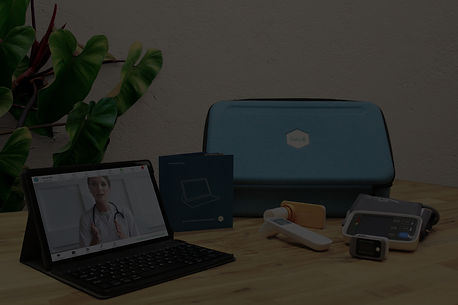
The person who is physically present with the patient is often known as the Telehealth Facilitator or GALE Operator. This person operates GALE, collects vital signs and measurements, assists with connected medical devices, and facilitates the telemedicine visit. The GALE Operator does not diagnose, interpret clinical findings, or make medical assessments unless separately qualified and authorized to do so.
The licensed healthcare professional connected remotely is who evaluates the patient, interprets clinical information, provides medical guidance, and makes clinical assessments or treatment decisions.
Where can we get covers for the Otoscope?
Order new Speculum covers here
Where can we get covers for the Dental Camera?
Parent/Guardian-related Questions
How do I give consent for this program?
Do I need to apply for the program?
What kinds of ailments can telehealth help my child with?
What kinds of ailments can telehealth not help my child with?
How much does a telehealth visit cost me?
Can I join the telehealth call?
-
Yes. A link can be sent to you at the time of the visit by either email or SMS text message. This link is only active during that call.
Who has access to my child's visit information?
-
During the visit, only the GALE operator at the school and those with authorized access to the 19Labs GALE platform. Specialists or translators may be invited to the call and gain temporary access to your child’s data, but as soon as the call is ended, their access will be revoked.
-
Patient data is not stored on the tablet. When an encounter is complete, patient data is cleared from the tablet. Encounters may be uploaded to a secure EHR.
Is my child's information stored on the tablet?
-
No. Every encounter is cleared off the tablet as soon as the session is ended.
-
If your child’s school or health center is integrated with an EHR system, the data is stored securely there and can only be accessed through the tablet with a secure login.
What happens to my child's visit information when the visit is over?
-
A copy can be printed for your records
-
A copy can be printed for the school’s records or the student's file
-
A copy may be uploaded to a secure patient portal or EHR
What happens to my child's visit information when the visit is over?
-
Discuss this with your student’s school or healthcare provider
Technical Questions
How do we keep patient data secure on GALE?
-
Patient data is never saved on the tablet
-
End your session
-
At the end of the visit, ensure you tap “End Session”. This will clear all patient data from the tablet
-
An inactivity timeout of 5 minutes is applied to GALE by default. If you forget to end your session, the encounter will time out and clear patient data. A pop-up will appear to warn you before clearing all data.
-
If GALE is integrated with an EHR, log out. Encounter date will be cleared from the tablet, and access to patient records will be removed. Patient data may only be obtained through the GALE tablet with a secure login to the EHR.
-
How can we save a visit summary?
The following must be done during an ongoing patient visit:
-
Clinician
-
Answer the call from the Call Center
-
Open Insights
-
Add clinical notes
-
To save for yourself:
-
Select “Export Summary”
-
Select “Download”
-
The visit summary will download to your computer
-
Upload the PDF summary to the patient’s profile
-
-
To share with the GALE operator and the Patient:
-
Select “Export Summary”
-
Select “Share”
-
Send the summary to GALE
-
-
-
Operator
-
Ask the clinician to share the Insights summary with GALE
-
Navigate to Measurements > Health History
-
Open Visit Summaries
-
Print the summary
-
After the encounter, whoever has access to the Patient's record can either upload the GALE summary PDF directly into the EHR or use the document as a reference to input the required details.
See Insights & Visit Summary for more details
How do we upload encounter details to our EHR?
-
If your GALE is not integrated with Athena: See the steps above regarding saving a visit summary
-
If your GALE is integrated with Athena: see our Athena Integration page